Getting to Know OpenClaw
What is OpenClaw and why use it
Before you start using OpenClaw, let's understand what it is, why you'd want to use it, and what it can do for you.
⚠️ Version Note: Since OpenClaw is still under rapid development, this tutorial is based on version 2026.3.2. This version has been thoroughly tested and is stable and reliable.
💡 Important Prerequisite: OpenClaw comes with 49 built-in Skills. Most of the feature demonstrations in this tutorial rely on these built-in Skills. They cover core scenarios such as file management, knowledge management, schedule management, and automation — all ready to use out of the box. If certain features aren't working, first check whether the relevant Skill is enabled (see Chapter 8: Skills Extension for details).
1.1 What is OpenClaw

In One Sentence
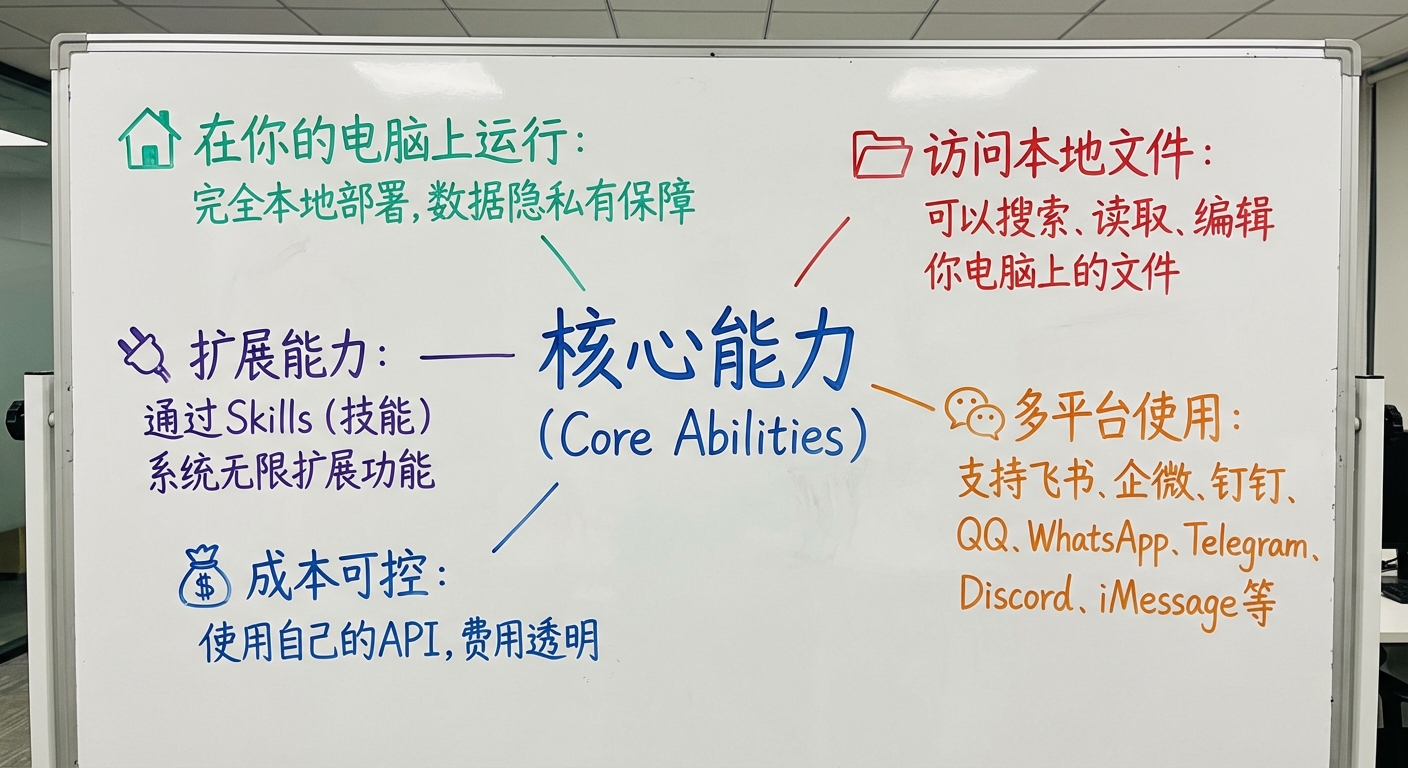
OpenClaw is an open-source AI agent Gateway that lets you deploy an AI assistant locally, access local files, and use it anytime through multiple platforms (Lark, WeCom, QQ, etc.).
Project Name History: OpenClaw was originally named Clawdbot. Due to Anthropic trademark concerns, it was renamed to Moltbot (a transitional name) on January 27, 2026, and finally settled on OpenClaw on January 30. All three names refer to the same project with identical functionality.
Core Capabilities
- 🏠 Local Deployment: Runs on your own computer, ensuring data privacy
- 📁 File Access: Can search, read, and edit files on your computer
- 🔌 Unlimited Extensibility: Extend functionality through the Skills system
- 💬 Multi-Platform Support: Works with Lark, WeCom, DingTalk, QQ, Telegram, Discord, and more
- 💰 Cost Control: Use your own API keys with transparent pricing
How It Works
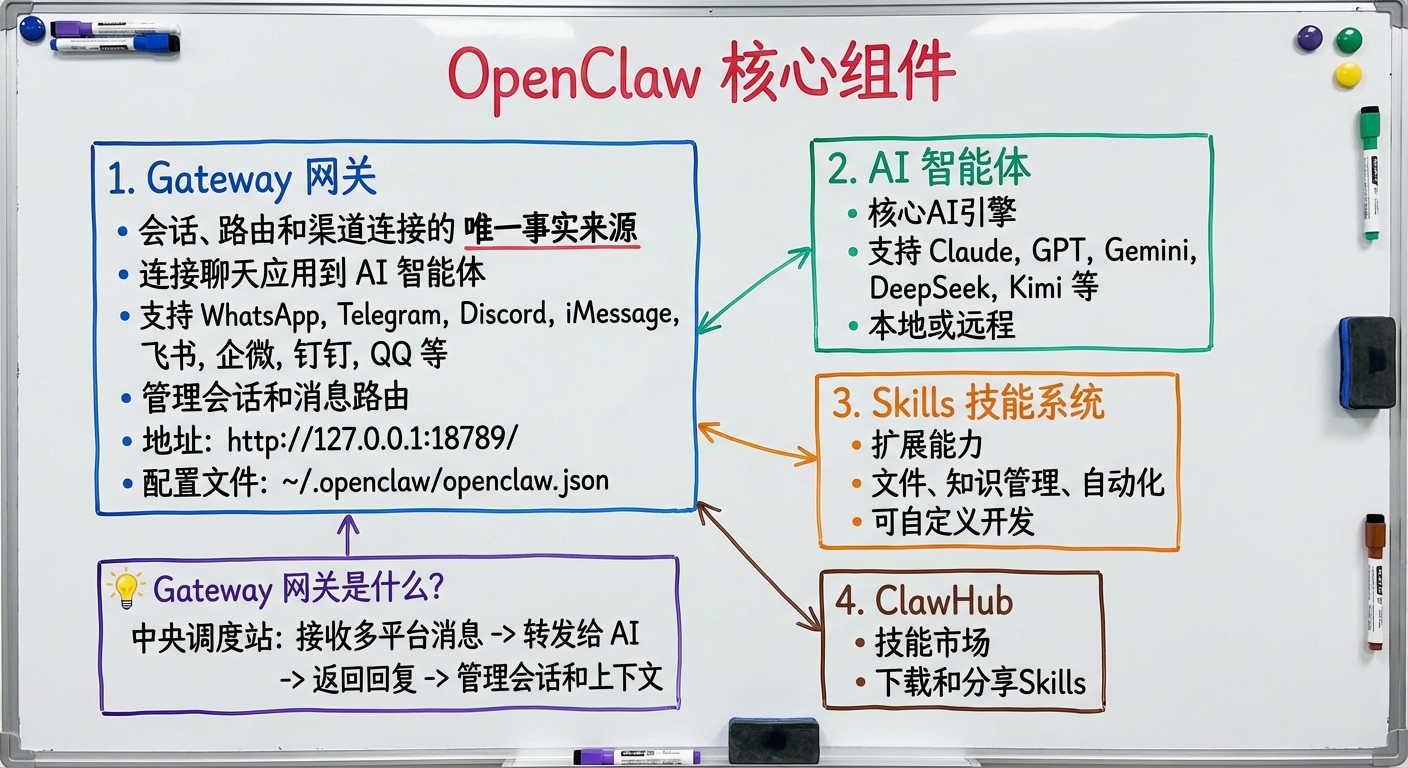
OpenClaw connects chat applications to AI agents through a Gateway. The Gateway is the single source of truth for sessions, routing, and channel connections.
Core Components:
-
Gateway
- Connects to various chat platforms (Lark, WeCom, QQ, Telegram, etc.)
- Manages sessions and message routing
- Default address:
http://127.0.0.1:18789/ - Configuration file:
~/.openclaw/openclaw.json
-
AI Agent
- Supports multiple models including Claude, GPT, Gemini, DeepSeek, Kimi, and more
- Can run locally or be called remotely
-
Skills System
- File management, knowledge management, automation, and more
- Supports custom development
-
ClawHub
- A Skills marketplace where you can download and share Skills
💡 What is the Gateway?
The Gateway is the core service of OpenClaw. Think of it as a "central dispatch hub" responsible for:
- Receiving messages from different platforms (Lark, WeCom, QQ, Telegram, etc.)
- Forwarding messages to the AI agent for processing
- Sending the AI's responses back to the corresponding platform
- Managing all sessions and context
This is why you can use OpenClaw on any platform — the Gateway manages all connections in a unified way.
1.2 Why Choose OpenClaw
The Fundamental Difference from Online AI
OpenClaw differs fundamentally from traditional online AI services in terms of deployment, data privacy, and extensibility, as shown in Table 1-3.
Table 1-3: OpenClaw vs. Online AI Comparison
| Feature | OpenClaw | ChatGPT/Claude Web |
|---|---|---|
| Deployment | Local/Cloud | Online Service |
| Data Privacy | ✅ Full control | ⚠️ Uploaded to servers |
| Local File Access | ✅ Supported | ❌ Not supported |
| System Operations | ✅ Supported | ❌ Not supported |
| Extensibility | ✅ Skills system | ❌ Fixed features |
| Cost | Pay-as-you-go | Subscription |
| Multi-Platform Integration | ✅ Supported | ⚠️ Limited |
In simple terms:
- ChatGPT/Claude: Like using a computer at an internet café — convenient but limited
- OpenClaw: Like your own computer — free but requires setup
Five Core Advantages
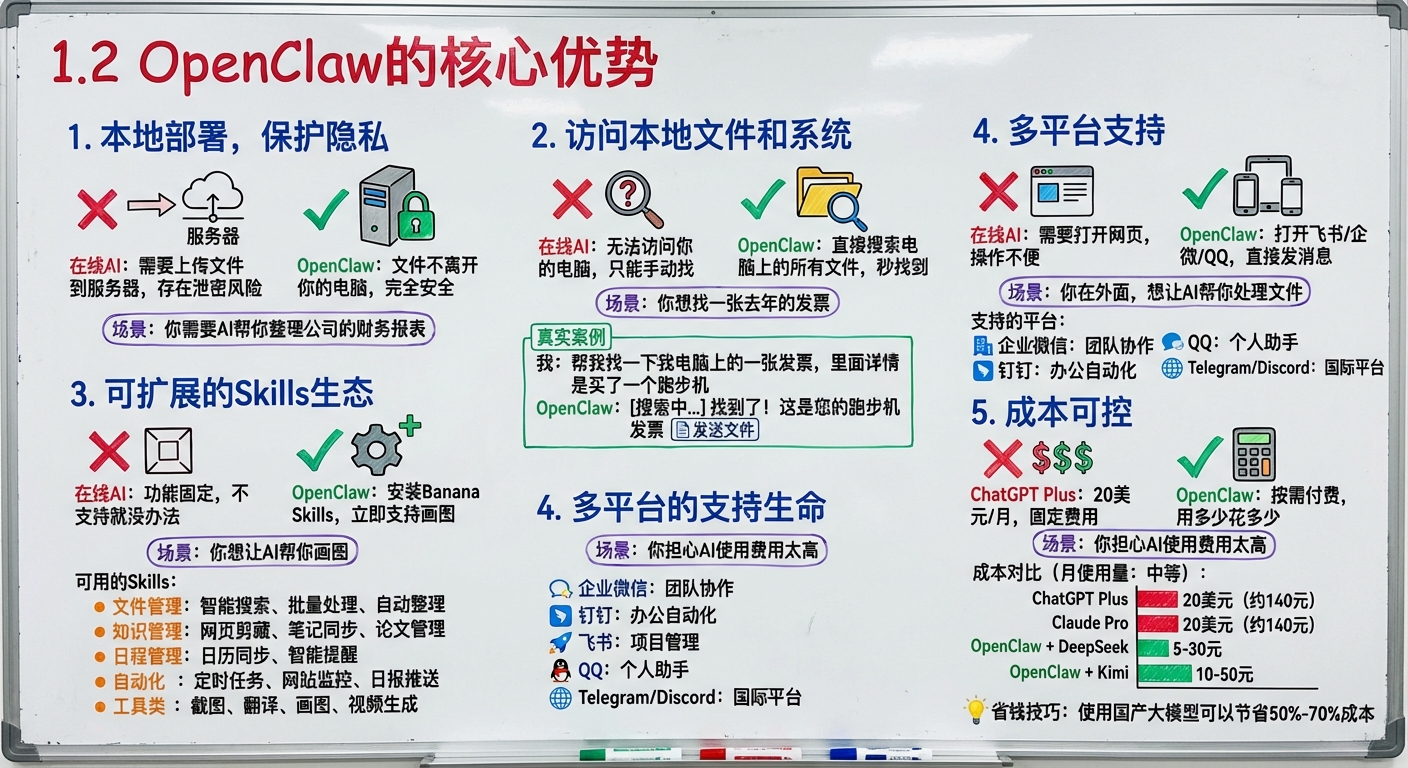
1. Local Deployment for Privacy Protection
Scenario: You need AI to help organize your company's financial reports
- ❌ Online AI: Requires uploading files to a server, risking data leaks
- ✅ OpenClaw: Files never leave your computer — completely secure
2. Access Local Files and System
Scenario: You want to find an invoice from last year
- ❌ Online AI: Can't access your computer; you have to search manually
- ✅ OpenClaw: Searches all files on your computer directly — found in seconds
Real Example:
Me: Help me find an invoice on my computer — it's for a treadmill purchase
OpenClaw: [Searching...] Found it! Here's your treadmill invoice [sends file]
3. Extensible Skills Ecosystem
Scenario: You want AI to help you generate images
- ❌ Online AI: Fixed features — if it's not supported, you're out of luck
- ✅ OpenClaw: Install Banana Skills and get image generation instantly
Available Skills:
- File Management: Smart search, batch processing, auto-organization
- Knowledge Management: Web clipping, note syncing, paper management
- Schedule Management: Calendar sync, smart reminders
- Automation: Scheduled tasks, website monitoring, daily report delivery
- Utilities: Screenshots, translation, image generation, video generation
4. Multi-Platform Support
Scenario: You're out and about and want AI to help process files
- ❌ Online AI: Need to open a web page — inconvenient
- ✅ OpenClaw: Open Lark/WeCom/QQ and send a message directly
Supported Platforms:
- 🏢 WeCom: Team collaboration
- 📱 DingTalk: Office automation
- 🚀 Lark: Project management
- 💬 QQ: Personal assistant
- 🌐 Telegram/Discord: International platforms
5. Cost Control
Scenario: You're worried about high AI usage costs
- ❌ ChatGPT Plus: $20/month, fixed fee
- ✅ OpenClaw: Pay-as-you-go — only pay for what you use
Cost Comparison (monthly usage: moderate):
- ChatGPT Plus: $20 (~¥140)
- Claude Pro: $20 (~¥140)
- OpenClaw + DeepSeek: ¥5–30
- OpenClaw + Kimi: ¥10–50
💡 Money-Saving Tip: Using domestic Chinese LLMs can save 50%–70% on costs
1.3 OpenClaw vs. Mainstream AI Tools
OpenClaw differs significantly from mainstream AI tools in terms of feature positioning and cost structure. Below is a detailed comparison across three dimensions: core features, cost, and target audience.
Core Feature Comparison
OpenClaw has clear advantages in local file access, system operations, and automation tasks, as shown in Table 1-1.
Table 1-1: Mainstream AI Tool Feature Comparison
| Feature | OpenClaw | ChatGPT Plus | Cursor | Claude Pro |
|---|---|---|---|---|
| Local File Access | ✅ Full support | ❌ Not supported | ✅ Supported | ❌ Not supported |
| System Operations | ✅ Calendar/Reminders/Screenshots | ❌ Not supported | ⚠️ Limited | ❌ Not supported |
| Multi-Platform Integration | ✅ Lark/WeCom/DingTalk/QQ | ⚠️ Limited | ❌ Not supported | ⚠️ Limited |
| Skills Extension | ✅ 1715+ | ❌ Not supported | ⚠️ Plugins | ❌ Not supported |
| Multi-Model Switching | ✅ Switch freely | ❌ Fixed to GPT | ✅ Supported | ❌ Fixed to Claude |
| Coding Capability | ✅ Strong | ⚠️ Moderate | ✅ Strong | ✅ Strong |
| Task Automation | ✅ Full support | ❌ Not supported | ❌ Not supported | ❌ Not supported |
Cost Comparison
OpenClaw uses a pay-as-you-go model, saving 73%–96% compared to fixed monthly subscription online services, as shown in Table 1-2.
Table 1-2: Annual Cost Comparison
| Item | OpenClaw | ChatGPT Plus | Cursor | Claude Pro |
|---|---|---|---|---|
| Monthly | ¥5–50 | ¥140 | ¥140 | ¥140 |
| Annual | ¥60–600 | ¥1,680 | ¥1,680 | ¥1,680 |
| Savings | - | 73%–96% savings | 73%–96% savings | 73%–96% savings |
| Billing Model | Pay-as-you-go | Fixed monthly | Fixed monthly | Fixed monthly |
Cost Breakdown:
- OpenClaw cost = Server cost (optional) + API cost
- Local deployment: ¥0 server + ¥5–30 API = ¥5–30/month
- Cloud deployment: ¥20 server + ¥5–30 API = ¥25–50/month
Target Audience
✅ Highly Recommended for:
- Solo entrepreneurs / Freelancers — Need one person to do the work of a team
- Knowledge workers — Need to manage large volumes of documents and knowledge
- Developers — Need coding assistance and automation
- Content creators — Need asset management and multi-platform publishing
- Privacy-conscious users — Don't want to upload sensitive files to the cloud
- Cost-conscious users — Want a high-value AI assistant
⚠️ If you only need simple conversations, consider:
- ChatGPT Plus: Simplest, works out of the box
- Claude Pro: Strong long-text processing capabilities
💡 Best Approach:
- Casual conversations: ChatGPT/Claude
- Work assistant: OpenClaw (local files, automation, multi-platform)
- Code writing: Cursor + OpenClaw
Real Case Study: Why I Chose OpenClaw
I'm a content creator, and every day I need to:
- Organize large amounts of research and articles
- Manage schedules and tasks
- Generate images and videos
- Publish content across multiple platforms
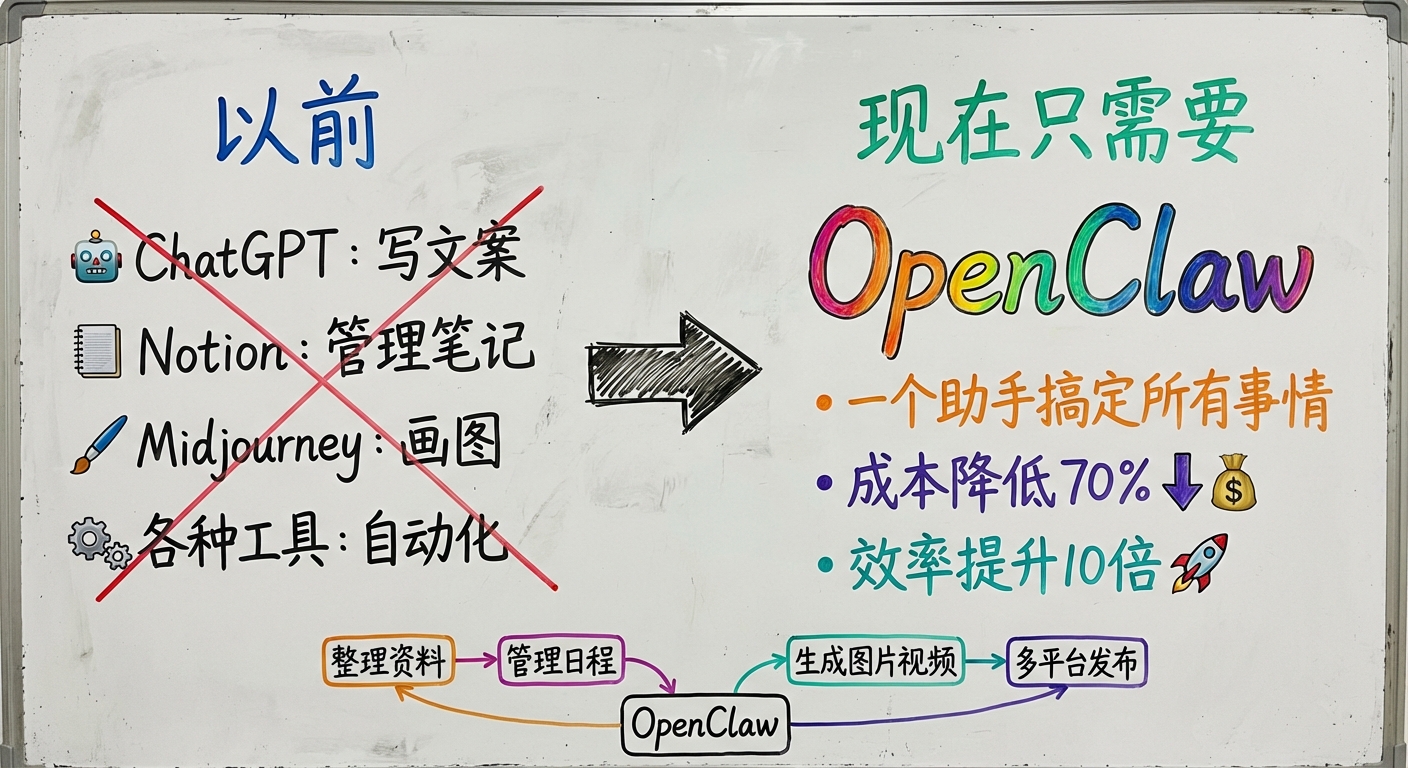
Before, I needed:
- ChatGPT: Writing copy
- Notion: Managing notes
- Midjourney: Creating images
- Various tools: Automation
Now I just need OpenClaw:
- One assistant handles everything
- Costs reduced by 70%
- Productivity increased 10x
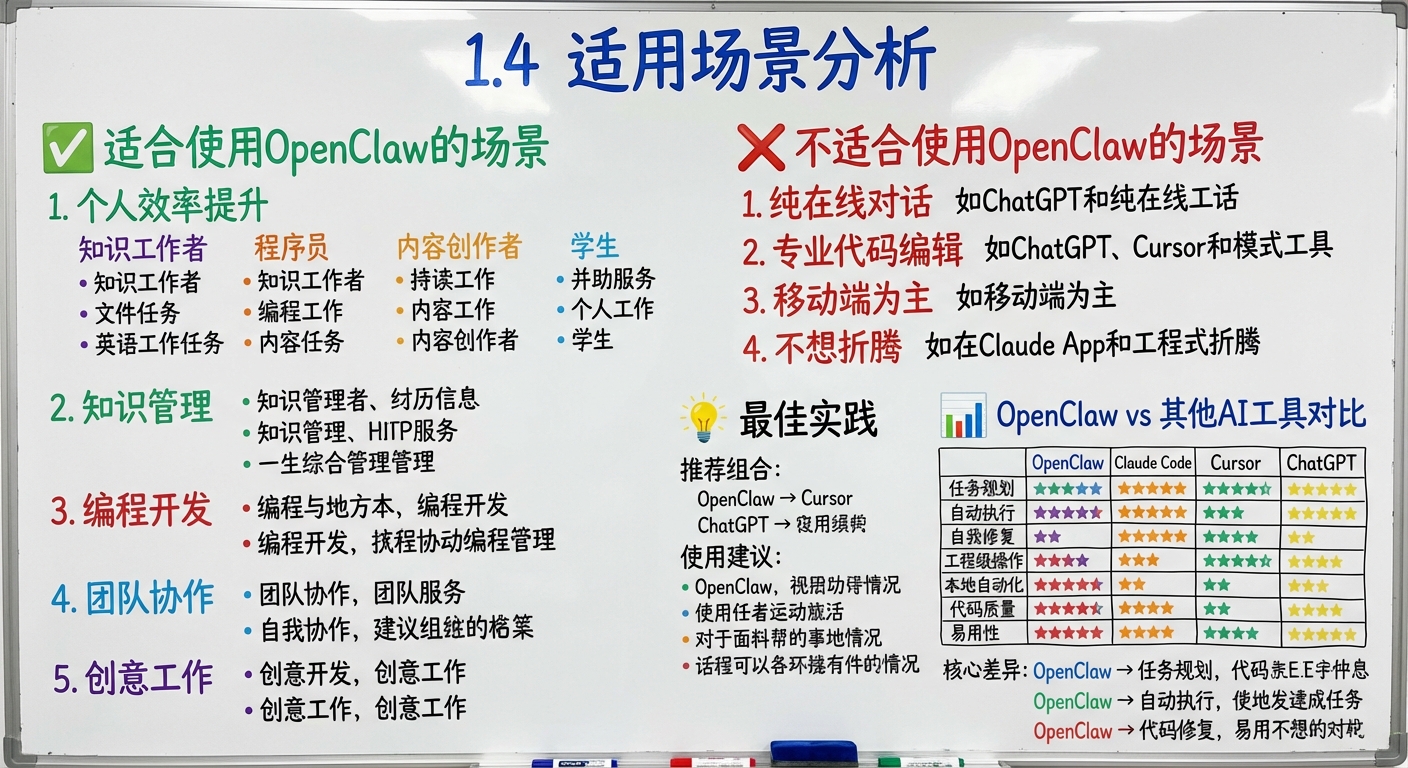
1.4 Use Cases
✅ Scenarios Where OpenClaw Excels
1. Personal Productivity
Knowledge Workers:
- Organizing large volumes of documents and materials
- Managing schedules and tasks
- Automating repetitive work
Developers:
- Code search and management
- Technical documentation organization
- Development environment management
Content Creators:
- Research collection and organization
- Content creation assistance
- Multi-platform publishing
Students:
- Course material management
- Paper reading and note-taking
- Study plan management
2. Knowledge Management
- Web article archiving
- GitHub project management
- Research paper note organization
- Cross-device syncing
3. Software Development
- Code search and comprehension
- Technical documentation lookup
- Development environment configuration
- Project management
4. Team Collaboration
- Project management automation
- Document collaboration optimization
- Meeting notes organization
- Team knowledge base building
5. Creative Work
- AI image generation workflows
- Video script generation
- Multilingual translation
- Data analysis automation
❌ Scenarios Where OpenClaw May Not Be the Best Fit
1. Simple Online Conversations
If you just want to chat with AI occasionally without accessing local files:
- ChatGPT web version is more convenient
- No installation or configuration needed
- Open and start using immediately
2. Dedicated Code Editing
If you only need code completion and editing:
- Cursor is more specialized
- GitHub Copilot is more convenient
- Tighter integration with your editor
3. Primarily Mobile Use
If you mainly use AI on your phone:
- ChatGPT App is more convenient
- Claude App is smoother
- No configuration needed
4. Prefer Zero Setup
If you:
- Don't want to learn a new tool
- Don't want to configure an environment
- Just want something that works out of the box
Then online AI services are a better fit for you.
💡 Best Practices
Recommended Combination:
- OpenClaw: Daily work assistant
- Cursor: Code editing
- ChatGPT: Mobile conversations
Usage Tips:
- On your computer: Use OpenClaw first
- Writing code: Use Cursor
- On the go: Use the ChatGPT App
1.5 OpenClaw vs. Other AI Tools: Capability Comparison
Different AI tools have different strengths across dimensions like task planning, autonomous execution, and code quality. OpenClaw stands out in task planning and automation, as shown in Table 1-4.
Table 1-4: AI Tool Capability Dimension Comparison
| Capability | OpenClaw | Claude Code | Cursor | ChatGPT |
|---|---|---|---|---|
| Task Planning | ⭐⭐⭐⭐⭐ | ⭐⭐⭐ | ⭐⭐⭐ | ⭐⭐⭐ |
| Autonomous Execution | ⭐⭐⭐⭐⭐ | ⭐⭐⭐ | ⭐⭐⭐ | ⭐⭐ |
| Self-Healing | ⭐⭐⭐⭐⭐ | ⭐⭐ | ⭐⭐ | ⭐ |
| Engineering-Grade Operations | ⭐⭐⭐⭐⭐ | ⭐⭐⭐⭐ | ⭐⭐⭐⭐ | ⭐⭐ |
| Local Automation | ⭐⭐⭐⭐⭐ | ⭐⭐ | ⭐⭐ | ⭐ |
| Code Quality | ⭐⭐⭐⭐ | ⭐⭐⭐⭐⭐ | ⭐⭐⭐⭐⭐ | ⭐⭐⭐⭐ |
| Ease of Use | ⭐⭐⭐ | ⭐⭐⭐⭐ | ⭐⭐⭐⭐⭐ | ⭐⭐⭐⭐⭐ |
Key Differences:
- OpenClaw: Excels at task planning and autonomous execution of complete engineering workflows
- Claude Code/Cursor: Excel at code quality and comprehension
- ChatGPT: Excels at conversational experience and ease of use
Chapter Summary
After reading this chapter, you should understand:
✅ What OpenClaw is: A local AI assistant that connects to multiple platforms through a Gateway
✅ Core advantages: Local deployment, file access, extensibility, multi-platform support, low cost
✅ How it differs from other AI tools: Better suited as a personal work assistant
✅ Ideal use cases: Productivity, knowledge management, software development, team collaboration
✅ Less ideal scenarios: Simple conversations, primarily mobile use, prefer zero setup
Discussion Questions
- What AI tools are you currently using? What problems have you encountered?
- Which OpenClaw feature appeals to you the most?
- What do you plan to use OpenClaw for?
Next Chapter: Chapter 2: Environment Setup - Complete installation in 5 minutes
Back to Table of Contents: README